Level Up Your Game: A Deep Dive into Gaming Mice with Side Buttons
In the fast-paced world of PC gaming, where milliseconds can mean the difference between victory and defeat, having the right tools is paramount. While a powerful CPU and high-end graphics card are essential, don’t underestimate the importance of your peripherals. A quality gaming mouse, in particular, can significantly enhance your performance and overall gaming experience. One feature that stands out in the realm of gaming mice is the inclusion of side buttons. These seemingly small additions can provide a significant competitive edge, streamlining your gameplay and unlocking new levels of control.
Why Side Buttons Matter: The Edge They Provide
Gaming mice with side buttons offer a multitude of benefits that extend beyond mere aesthetics. Here’s a breakdown of why they’re so popular among gamers:
-
Increased Efficiency: Side buttons allow you to map frequently used in-game actions, macros, or keyboard commands directly to your mouse. This reduces the need to reach across your keyboard, saving valuable time and minimizing disruptions to your aim and movement.
-
Enhanced Customization: Most gaming mice with side buttons come with dedicated software that allows you to customize the functionality of each button. You can assign them to anything from simple keystrokes to complex macro sequences, tailoring your mouse to your specific playstyle and the demands of your favorite games.
-
Improved Accessibility: For gamers with disabilities or those who prefer to keep their left hand focused on movement, side buttons offer a more accessible way to perform actions that would otherwise require using the keyboard.
-
Competitive Advantage: In competitive games where split-second decisions are crucial, having instant access to critical abilities or commands can give you a significant advantage over your opponents. Side buttons allow you to react faster and execute complex maneuvers with greater precision.
-
Ergonomic Benefits: By mapping frequently used actions to the side buttons, you can reduce the strain on your left hand and wrist, which can help prevent fatigue and repetitive strain injuries during long gaming sessions.
Types of Side Buttons and Their Applications
Side buttons on gaming mice come in various shapes, sizes, and configurations, each catering to different needs and preferences. Here’s a look at some common types:
-
Standard Two-Button Layout: This is the most common configuration, typically featuring two buttons positioned on the left side of the mouse, within easy reach of your thumb. These buttons are often used for basic functions like forward and backward navigation in web browsers, but they can also be mapped to in-game actions like weapon switching, grenade throwing, or voice communication.
-
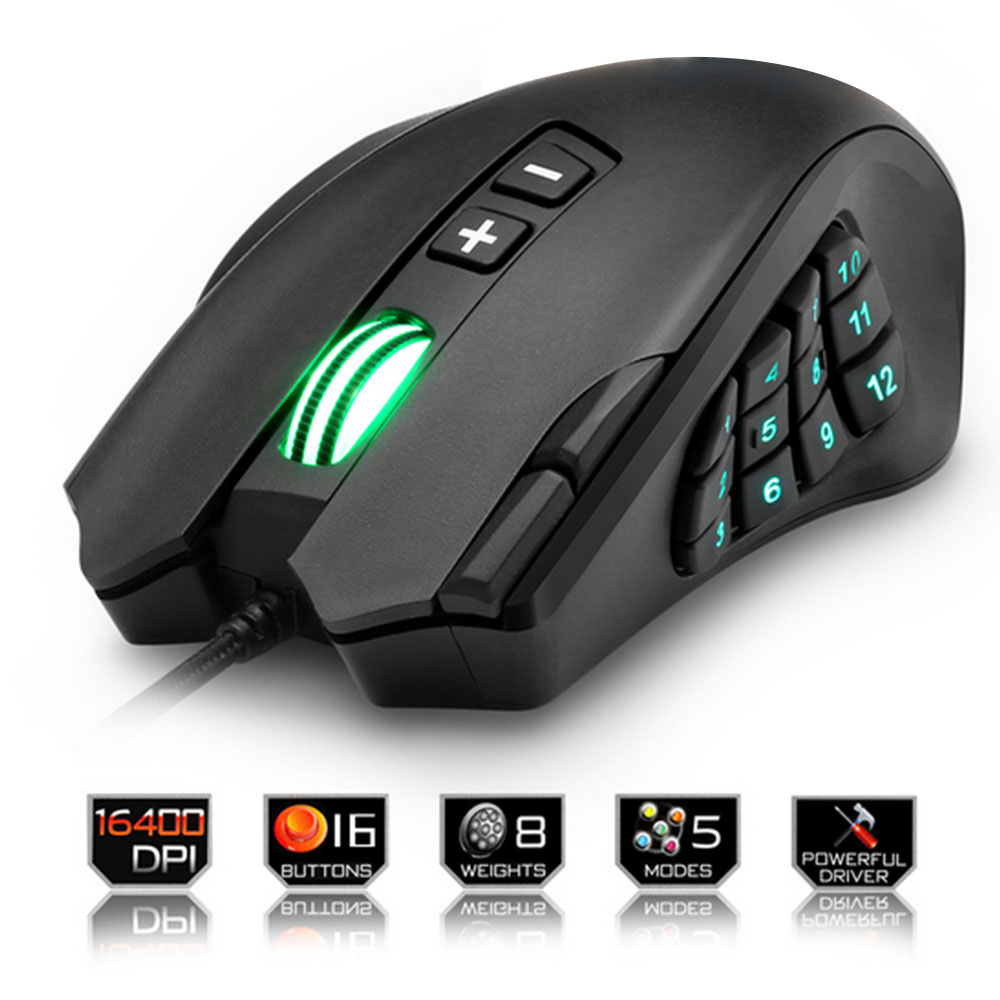
Multi-Button Arrays: Some gaming mice feature a grid of multiple side buttons, often arranged in a 3×4 or 4×4 configuration. These arrays provide a wealth of customization options, allowing you to map a wide range of actions to your mouse. They are particularly popular among MMO and MOBA players, who often need quick access to numerous abilities and commands.
-
Sniper Buttons: These buttons are typically located near the thumb and are designed to be held down temporarily. When pressed, they usually lower the mouse’s DPI (dots per inch), providing greater precision for aiming with sniper rifles or other long-range weapons.
-
Programmable Scroll Wheel Buttons: Some gaming mice feature scroll wheels that can be tilted left or right, effectively adding two additional programmable buttons. These buttons can be used for a variety of functions, such as strafing, leaning, or cycling through inventory items.
Choosing the Right Gaming Mouse with Side Buttons
With so many options available, selecting the perfect gaming mouse with side buttons can be a daunting task. Here are some factors to consider:
-
Grip Style: Your grip style (palm, claw, or fingertip) will influence the type of mouse that feels most comfortable in your hand. Palm grip users typically prefer larger mice with ergonomic shapes, while claw and fingertip grip users may prefer smaller, more ambidextrous designs.
-
Hand Size: The size of your hand is another important factor to consider. If you have large hands, you’ll want a mouse that’s large enough to fill your palm comfortably. If you have small hands, you’ll want a smaller mouse that’s easier to grip and control.
-
Button Placement and Accessibility: Consider the placement and accessibility of the side buttons. Make sure they’re within easy reach of your thumb and that they don’t require excessive stretching or contorting your hand.
-
Sensor Quality: The sensor is the heart of any gaming mouse. Look for a mouse with a high-quality sensor that offers accurate tracking, low latency, and adjustable DPI settings.
-
Build Quality and Durability: Choose a mouse that’s made from durable materials and feels solid in your hand. A well-built mouse will withstand the rigors of intense gaming sessions and last for years to come.
-
Software and Customization Options: Check the software that comes with the mouse. Does it offer a wide range of customization options? Is it easy to use and navigate? Can you create and save multiple profiles for different games or applications?
-
Wired vs. Wireless: Both wired and wireless gaming mice have their pros and cons. Wired mice offer a more reliable connection and lower latency, while wireless mice provide greater freedom of movement. Consider your priorities and choose the type that best suits your needs.
Popular Gaming Mice with Side Buttons
Here are some highly-regarded gaming mice with side buttons that are popular among gamers:
-
Razer Basilisk V3: A highly customizable mouse with a comfortable ergonomic design, a high-performance sensor, and a programmable scroll wheel.
-
Logitech G502 Hero: A classic gaming mouse with a versatile design, a precise sensor, and a plethora of customizable buttons.
-
Corsair Scimitar RGB Elite: Designed specifically for MMO and MOBA players, this mouse features a 12-button side panel that can be fully customized.
-
SteelSeries Rival 5: A versatile mouse that offers a comfortable grip, a precise sensor, and nine programmable buttons.
-
Glorious Model O: A lightweight gaming mouse with a honeycomb design, a high-performance sensor, and two side buttons.
Tips for Maximizing Your Side Button Usage
Once you’ve chosen the perfect gaming mouse with side buttons, here are some tips for maximizing their effectiveness:
-
Start Simple: Don’t try to map every button at once. Start with a few essential actions and gradually add more as you become comfortable.
-
Experiment: Try different button configurations to find what works best for you. There’s no one-size-fits-all solution.
-
Practice: Spend time practicing with your new button assignments in a variety of games and situations.
-
Use Macros Wisely: Macros can be powerful tools, but don’t overuse them. Focus on mapping actions that require quick execution or complex sequences.
-
Adjust DPI Settings: Experiment with different DPI settings to find the sensitivity that works best for you.
Conclusion
Gaming mice with side buttons are powerful tools that can significantly enhance your gaming experience. By providing increased efficiency, enhanced customization, and improved accessibility, they can give you a competitive edge and help you dominate the virtual battlefield. Whether you’re a seasoned pro or a casual gamer, investing in a quality gaming mouse with side buttons is a decision you won’t regret. Take the time to research your options, consider your needs and preferences, and choose a mouse that fits your playstyle. With the right mouse in hand, you’ll be well on your way to leveling up your game and achieving new heights of performance.